
用Draw Things AI打造未来视觉:玻璃社交名片 & 棱镜Logo完整教程
标签: AI, Ai创作, Draw things
- 该话题为空。

- 作者帖子
- 2026-04-27 - 11:02 #131556
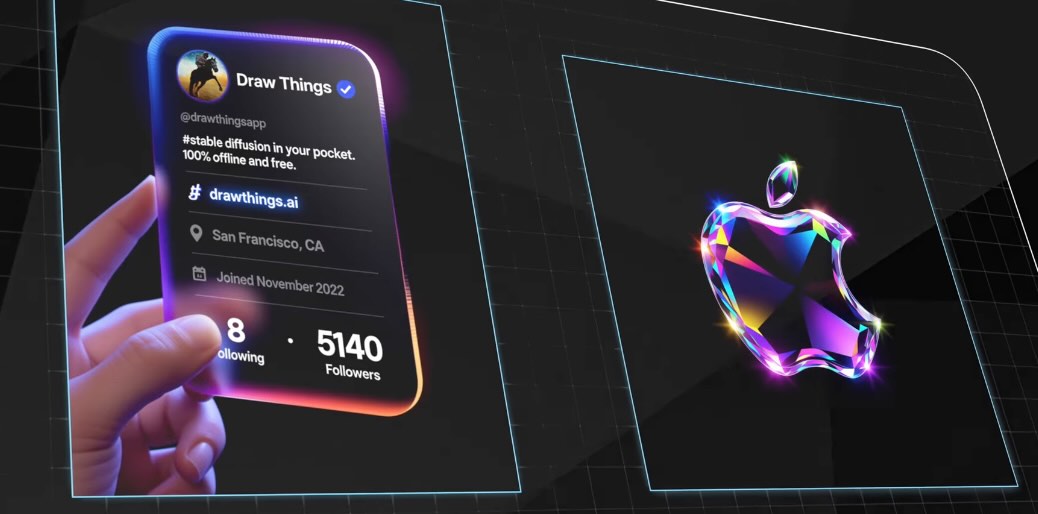
追光参与者AI设计最近在设计圈和社交媒体上有两种视觉风格非常火:霓虹玻璃面板社交名片,玻璃棱镜光谱 Logo,它们的共同特点是:未来感强、信息清晰、视觉高级。这篇教程将手把手教你,用 Qwen Image + Draw Things 实现这两种效果,而且是稳定、可控、可定制的专业流程。这里流程中使用的模型主要有俩种生图模型、图片编辑模型、可以使用qwen 模型也可以使用flux2、z image或者其他你喜欢的模型来制作。主要展示流程和提示词写。
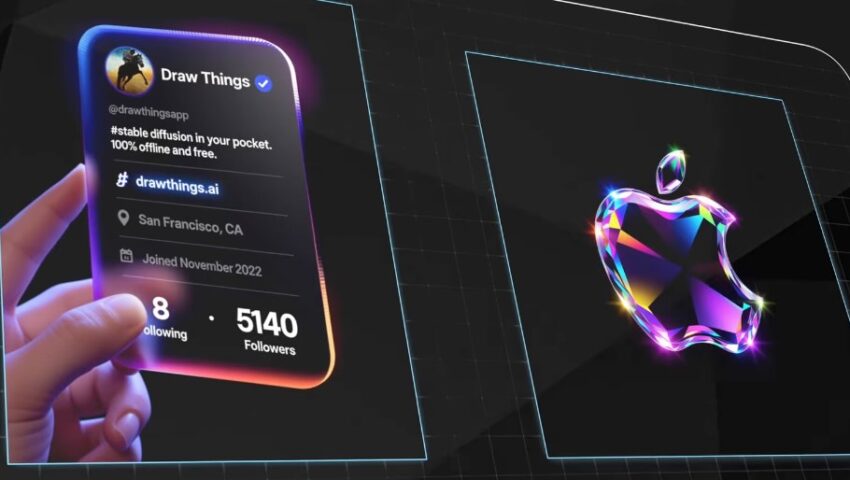
一、核心方法思路(一定要先理解)
很多人会尝试“一步生成”,但效果往往:文字崩坏,排版混乱,不可控。
? 正确方法是:
分两步完成(重点)1. 生图模型(Qwen Image 1.0) → 做结构 + 文字;2. 编辑模型(Qwen Image Edit 2509) → 做替换 + 精修。
第一步、霓虹玻璃面板社交名片制作
Step 1:生成高质量玻璃名片底图
模型:Qwen Image 1.0/2509/2511/2512
步数:8步
尺寸:960 × 1280(3:4大图)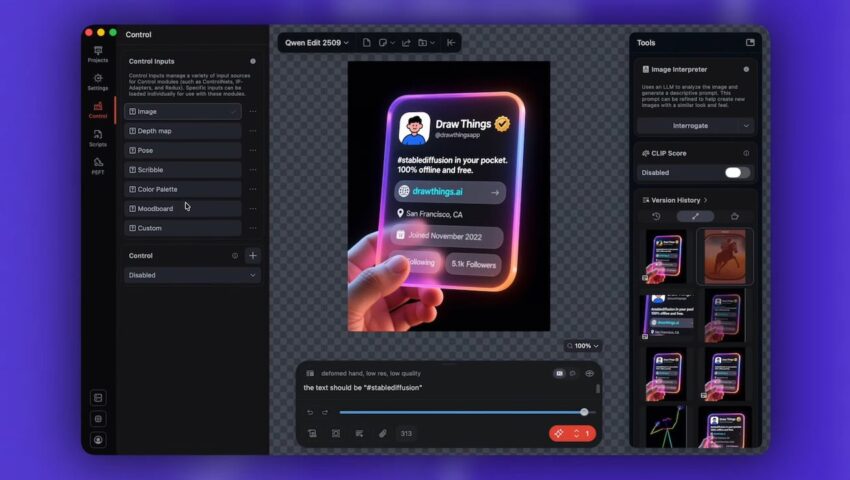
? 提示词原则(核心):你要做的不是“描述一张图”,而是: 描述一个完整UI界面结构,包括:头像、用户名、ID、简介、网站、地点、时间、粉丝数
✏️ ①英文提示词(推荐优先用)
his is a futuristic holographic floating account profile page interface, steadily presented by a hand naturally holding it from the lower right corner. The hand style should be realistic with detailed skin texture.The interface is a 3D rounded rectangular transparent glass panel with dynamic gradient neon glow around the edges (purple → pink → orange), set against a deep black background to emphasize the tech aesthetic and floating effect.
Top left: rounded rectangle cartoon avatar (simple line drawing style male, blue clothes on white background). Top right: username “Draw Things” in white sans-serif bold, followed by a small solid golden verification badge with a black checkmark.
Below, line by line information:
– Second line: light gray small font “
@drawthingsapp
”, right under the username, the account ID.
– Third line: white medium font “#stablediffusion in your pocket. 100% offline and free.”, semantic functional description, no separators.
– Fourth line: light blue link font, prefixed with a minimalist white globe icon, followed by “drawthings. ai”, representing the official website.
– Fifth line: light gray small font, prefixed with a location icon (?), followed by “San Francisco, CA”, the location.
– Sixth line: light gray small font, prefixed with a calendar icon (?), followed by “Joined November 2022”, showing join date.
– Bottom line: “8 Following” on the left, “5.1k Followers” on the right, the bottom line words are the same height in the same line.✏️ ②中文提示词(可替代)
(适合中文内容,但稳定性略低)
这是一个未来感的全息悬浮账户资料页面界面,由一只自然从左下角拿捏的手稳稳捏住展示。手部风格应真实,具有细致的皮肤纹理。界面为一个三维圆角矩形透明玻璃面板,边缘带有动态渐变霓虹光效(紫 → 粉 → 橙),背景为深黑色,以突出科技美感与悬浮效果。
左上角:圆角矩形卡通头像(简洁线条风格的男性,蓝色衣服,白色背景)。
右上角:用户名 “Draw Things”,白色无衬线加粗字体,后接一个带黑色对勾的实心金色认证徽章。以下为逐行信息:
• 第二行:浅灰色小号字体 “@drawthingsapp”,位于用户名下方,为账户 ID。
• 第三行:白色中号字体 “#stablediffusion in your pocket. 100% offline and free.”,语义性功能描述,无分隔符。
• 第四行:浅蓝色链接字体,前缀极简白色地球图标,后接 “drawthings.ai”,表示官方网站。
• 第五行:浅灰色小号字体,前缀定位图标 (?),后接 “San Francisco, CA”,表示所在地。
• 第六行:浅灰色小号字体,前缀日历图标 (?),后接 “Joined November 2022”,表示加入日期。
• 底行:左侧为 “8 Following”,右侧为 “5.1k Followers”,底行文字在同一水平线上且高度一致。⚠️ 常见问题:有轻微拼写错误 → 正常,UI结构没问题 → 就算成功80%
第二步:替换成你的 Logo(关键)
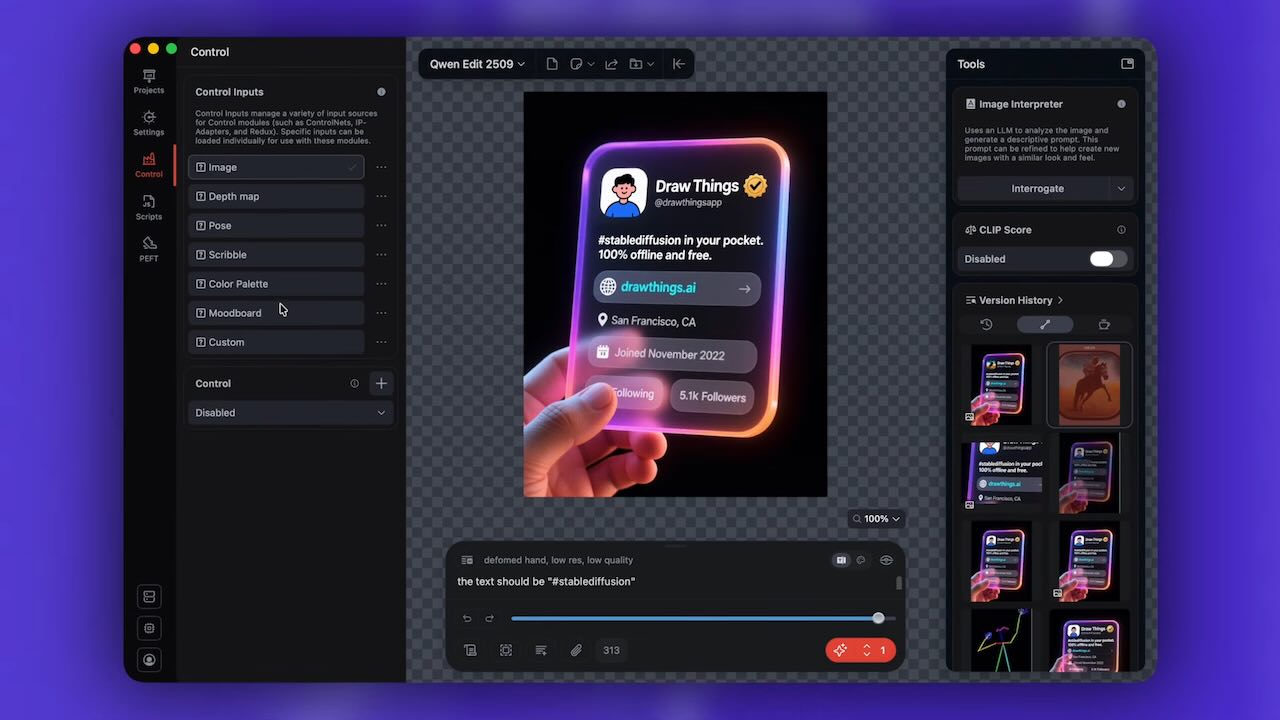
模型:Qwen Image Edit 2509
步数:4步操作流程:1. 导入 Step1 图片;2. 在“创意板”放入你的 Logo;3. 输入提示词:
Replace the logo of this data chart with the logo in pic2.4. 生成效果:自动匹配透视;自动融合材质;保持整体风格统一
进阶技巧(专业向)可以进一步:用 Photoshop → 消失点工具、手动贴 Logo、控制更精确的透视和反射
三、玻璃棱镜光谱 Logo 制作
这一部分比名片简单很多,一步完成
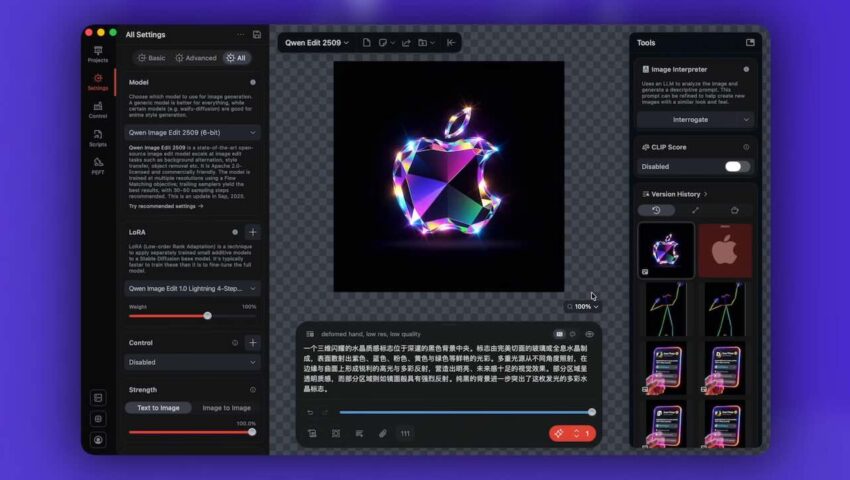
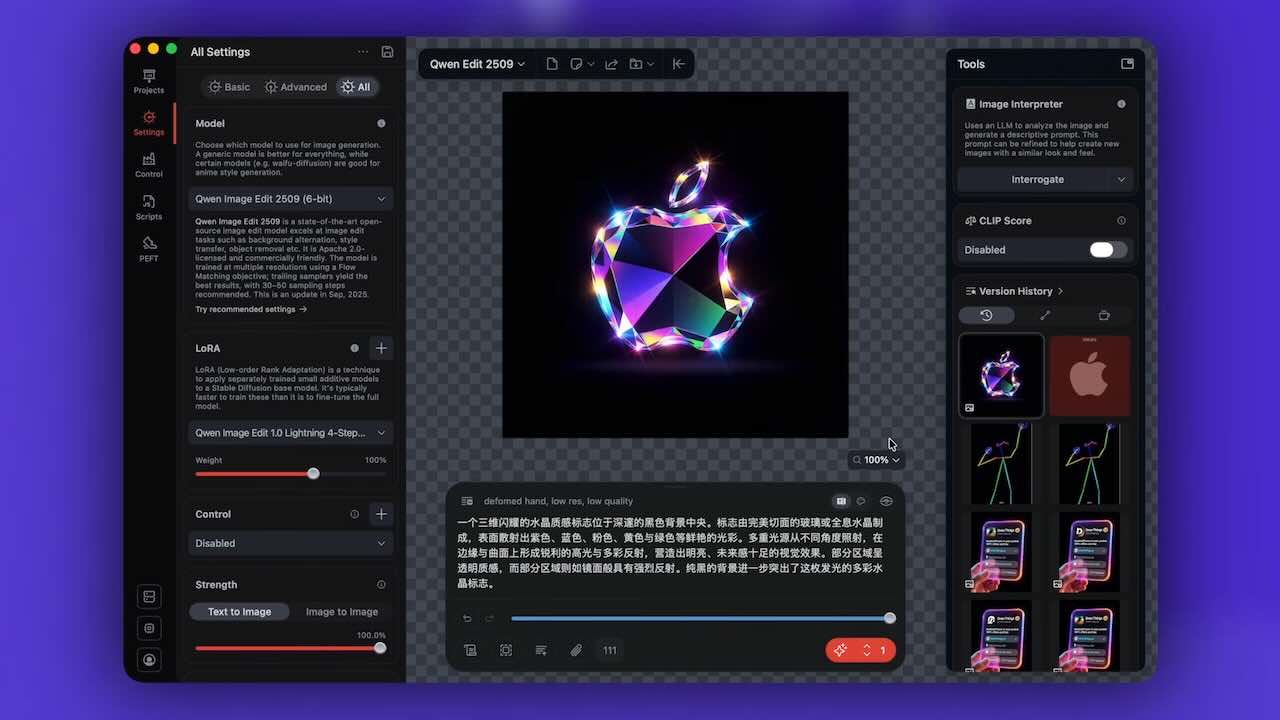
模型:Qwen Image Edit 2509
画布:空
创意板:放 Logo英文提示词
English Version 1(版本1):
A 3D shimmering crystal logo is placed at the center of a deep black background. The emblem is crafted from flawless, faceted glass or holographic crystal, featuring a radiant surface that scatters light into vivid shades of purple, blue, pink, yellow, and green. Multiple light sources illuminate it from different angles, producing sharp highlights and colorful reflections along its edges and curves, creating a bright, futuristic visual effect. Some parts are transparent, while others act like mirrors with intense reflectivity. The pure black background emphasizes the glowing, multicolored crystal form of the logo.English Version 2(版本2):
A surreal 3D glass prism–style logo presented in a transparent, faceted crystal form, with its surface refracting flowing rainbow spectra—red, orange, blue, green, and more—while the edges emit bright highlights and cinematic lens flares. Set against a pure black background, the logo appears to float and glow, creating a strong futuristic visual impact. The material features high gloss and rich internal refraction, blending sci-fi aesthetics with luxurious craftsmanship, ideal for technology brands or digital products seeking to convey innovation, intelligence, and a premium image.中文提示词
Chinese Version 1(版本1):
一个三维闪耀的水晶质感标志位于深邃的黑色背景中央。标志由完美切面的玻璃或全息水晶制成,表面散射出紫色、蓝色、粉色、黄色与绿色等鲜艳的光彩。多重光源从不同角度照射,在边缘与曲面上形成锐利的高光与多彩反射,营造出明亮、未来感十足的视觉效果。部分区域呈透明质感,而部分区域则如镜面般具有强烈反射。纯黑的背景进一步突出了这枚发光的多彩水晶标志。Chinese Version 2(版本2):
这是一种超现实3D玻璃棱镜风格的logo,整个Logo和文字以透明切割晶体形态呈现,表面折射出流动的彩虹光谱(红、橙、蓝、绿等),边缘散发高光与镜头眩光特效,在纯黑背景下营造出悬浮、发光、未来感十足的视觉冲击。材质具有高度光泽与内部折射质感,融合科幻美学与奢华材质表现,适合科技品牌或数字产品传递创新、智能与高端形象。
- 作者帖子

- 在下方一键注册,登录后就可以回复啦。
 京公网安备
京公网安备  工信部备
工信部备